A home for every repo.
Open, initialize or clone repositories into a workspace. Pin favorites and search the repository picker while keeping your graph context.
Every repository. Every change. One clear view.
Meet the local-first Git workspace that brings your branches, commits, and changes into focus. Less friction. More flow.
 GitNova studio Search commits… ⌘ K
a91d3b7Keep every repository in context
feature/workspaces− const context = repository;+ const context = workspace;↖Illustrative repository · select a commit to explore
BUILT IN THE OPEN
Explore the source, follow the progress, and help shape what comes next. Every contribution starts somewhere.
edocstudio/gitnovaGitHub · refreshes hourlyGitHub-listed contributors · PRs include open and closedCommit branch: main
GIT, IN 32 SECONDS
From your first edit to two branches coming together. Watch the Git workflow take shape, one step at a time.
Git tracks changes, so every version has a story.
Working changes are edits in your files. Stage only the changes for your next commit; unfinished work can stay unstaged.
A commit saves a snapshot of staged content. Add a message that explains the change.
Create a branch to explore a new idea. Your main line and new branch can move independently.
Review and merge the branch histories. If changes conflict, resolve them before completing the merge.
Git made simple. Every repository. Every change.
YOUR GRAPH-FIRST WORKSPACE
Graph-first. Follow the thread from a branch to a single line of code. Everything stays connected, so you can keep your focus.
Trace parallel branches in a graph with resizable columns. Keep branch, CI, author and date context in view.
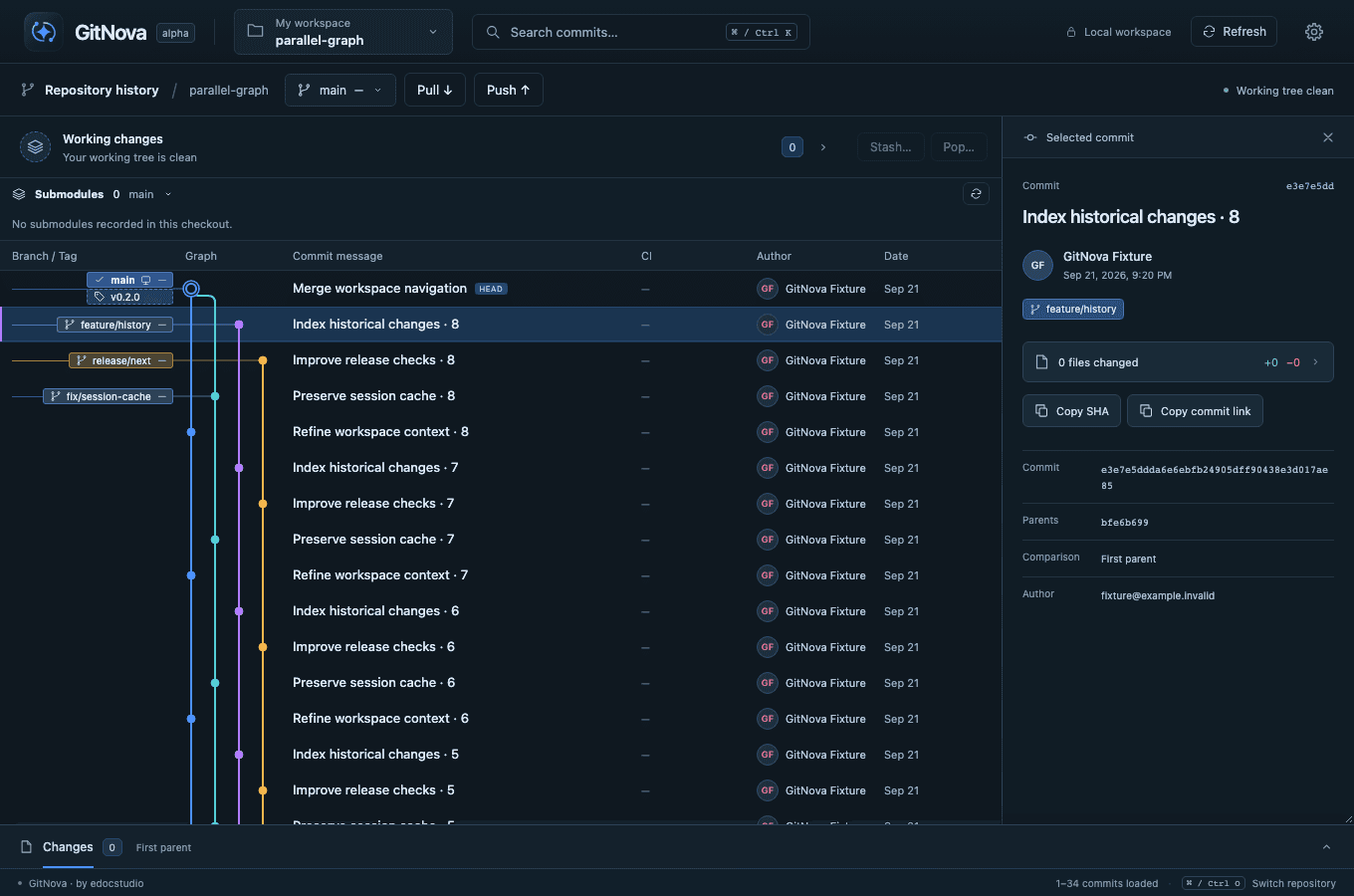
Actual GitNova development screenshots using test repositories. The interface is evolving.
LESS FRICTION. MORE FLOW.
Open, initialize or clone repositories into a workspace. Pin favorites and search the repository picker while keeping your graph context.
Review commits and amendments, stage supported text hunks, and work through linear Rebase and three-way conflicts in context.
Create a linked worktree for another branch. Review Lock, Unlock, Repair or supported removal while keeping current work in place.
Review Fetch, Pull and Push; configure active-repository auto fetch. Create PRs/MRs and see exact-commit GitHub Actions or GitLab pipeline runs in the graph.
LOCAL FIRST. BY DESIGN.
GitNova works with real repositories on your machine. Browse history, inspect diffs, and prepare commits locally. Connect your remotes when you need them.
RUST FOUNDATION. MEASURED PROGRESS.
A repeated search, with less time between you and the answer. See what changed in our local GitNova development builds.
One block = 10 ms · same scale in both panels
The earlier build, with an already-warm search index.
One block = 10 ms · same scale in both panels
The optimized build, with an already-warm search index.
Median of 10 immediate-repeat queries per build · 20,100 commits across two repositories
Local development builds on Apple M1 Pro. Code and compiler settings changed together. Push and cold indexing showed no demonstrated improvement.
START YOUR NEXT CHAPTER
GitNova is an early preview. Build it locally on your Mac while signed public installers are being prepared.
ALPHA 0.1.0Build a standalone app from your GitNova checkout on Apple silicon. The built app needs Git; Rust, Cargo and Node.js are source-build tools.
Install Rust/Cargo and the platform build tools first. npm ci installs JavaScript dependencies; npm and nvm do not install Rust or Cargo.
cd apps/desktop
npm ci
npm run doctor
npm run build:local
Build requirements: Git, Node.js 20.x (20.19+) or 22.12+, stable Rust 1.98+ with Cargo, and Tauri platform dependencies.
Run from the root of your existing GitNova checkout. Open the .app path printed by the builder. This is a local ad-hoc-signed debug build, not a notarized release.
THE ROAD AHEAD
A look at what is here in the alpha, what comes next, and where GitNova is heading.
Create a local repository from the workspace picker, pin projects and keep context while switching.
Per-file commit and Amend review, linear Rebase, tracked-text hunks and related-worktree maintenance within supported bounds.
Saved column widths, configurable active-repository auto fetch and exact-commit CI run numbers and links.
Extend Rebase and hunk support; complete the remaining submodule and worktree operations.
Foreground profiling, memory use and large-workspace search beyond the recorded background run.
Expand defect checks and recovery coverage for interrupted or partially completed operations.
File and code history investigation, with planned SQLite FTS5 indexing.
Richer change previews and investigation of coordinated releases across repositories.
Public installers, macOS notarization and full native validation on Windows and Linux remain planned.
Based on the GitNova project roadmap and delivery priorities. Scope and order may evolve; release dates are not committed.
GOOD TO KNOW
Getting started or working through a change? Find practical answers in the GitNova guide.
Explore the FAQ & guide25GitNova is an alpha Git client with real local Git workflows and a local macOS build. The broader multi-repository MVP, wider platform validation, and notarized releases are still in progress. Start with a test repository and review each action.
Yes. Local history, diffs, staging, and commit preparation work with repositories on your machine. Remote operations need network access and Git authentication. Hosting features and CI connections are optional.
Create and open GitHub pull requests or GitLab merge requests. Connected CI can show GitHub Actions workflow runs and GitLab pipelines for the exact commit, including available run numbers and links. Hosted merging and full merge eligibility remain planned.
Linear Rebase, tracked-text hunk staging and worktree Lock/Unlock/Repair are available within their supported scope. Broader Rebase/hunk coverage, remaining submodule/worktree lifecycle operations, file/code search and public installers are still planned.
Open Working changes, select a file to inspect its diff, then Stage file or Stage all changes. Enter a summary, review the staged files and confirm the commit. Only staged content enters the commit; committing does not publish it. Push publishes to a remote.
Stage copies the selected changes into the next commit’s staging area. Unstage removes them from that area while keeping working files. Discard restores the reviewed scope and can remove new files. Review its exact scope before confirming; recovery information is shown after supported operations.